Excel · Reporting modernization · Dashboard design
Monthly Sales Report Overhaul
A redesign of an outdated sales report into a scalable, row-based Excel model with modern formulas, PivotTable analysis, and a dashboard showing a complete monthly performance snapshot.
Project overview
Turning a fixed report into a scalable reporting model.
The existing monthly sales report had become difficult to maintain. Branch data was entered horizontally across columns, legacy formulas supported the report, and the workbook did not include charts or a consolidated dashboard.
I redesigned the source layout so sales records could be added down rows inside an Excel Table. I then updated the workbook with XLOOKUP and other modern formulas, created PivotTable-based charts, and built a dashboard that presented the month’s sales position in one view.
Business challenge
The report grew wider whenever a branch was added.
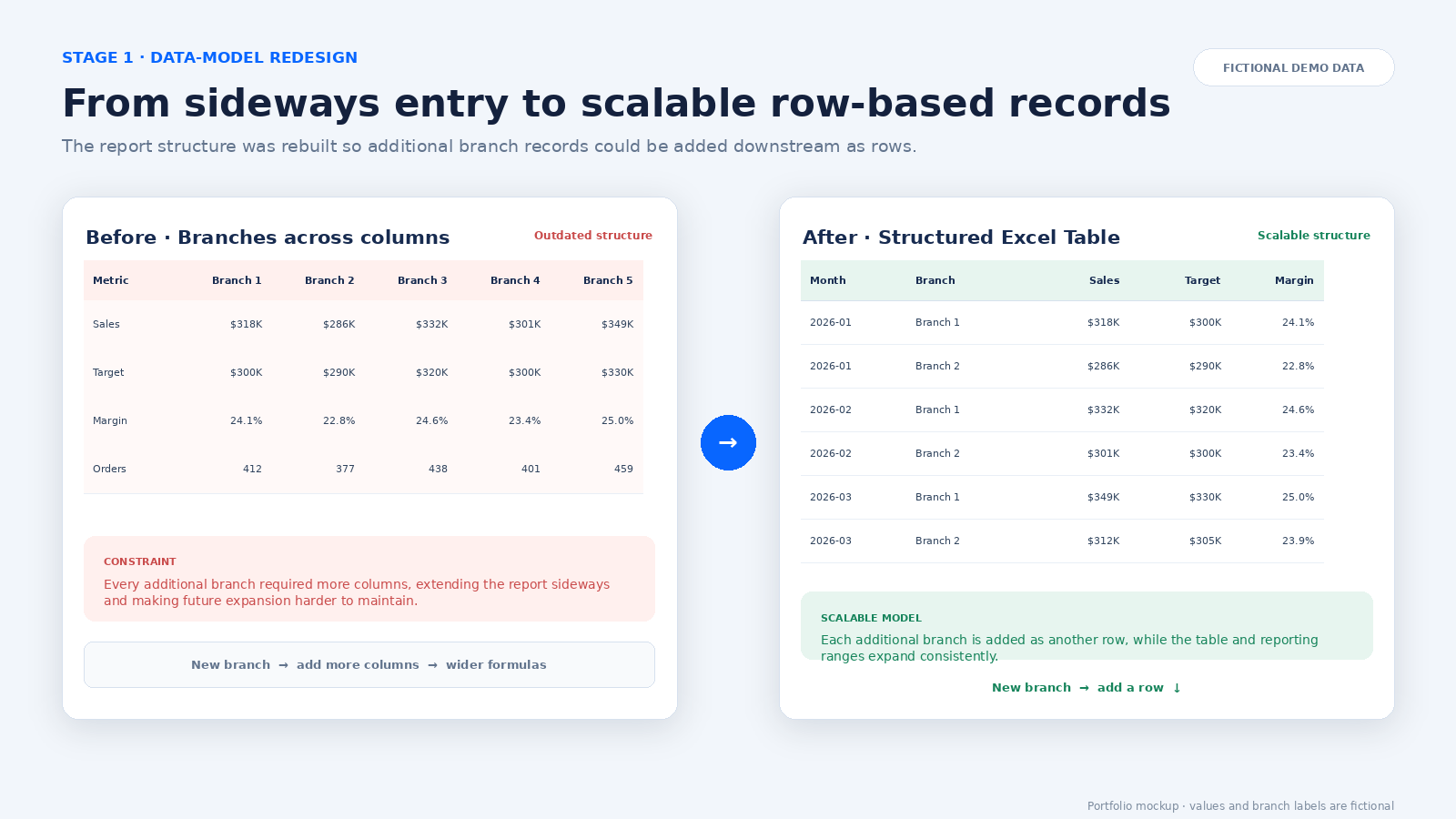
The original layout placed branches side by side across the worksheet. Every additional branch required another set of columns, which made the sheet wider and increasingly difficult to navigate and maintain.
- Branch data was recorded horizontally rather than in a consistent list of records.
- Adding a branch required extending the worksheet with new columns.
- Formula ranges and references could require manual adjustment as the report changed.
- Older formulas made the logic less flexible and harder to maintain.
- The workbook did not include PivotCharts or a dashboard.
- Users could not quickly see the complete monthly sales position in one place.
Project objective
Build a report structure that could accommodate additional branches without sideways expansion, simplify formula maintenance, and provide a clear visual summary of monthly sales performance.
Data-model redesign
Additional branches became rows, not columns.
The mockup below illustrates the core structural change. All branch names and sales figures are fictional.
Formula modernization
Cleaner logic built on structured references.
Once the data was converted into an Excel Table, I replaced outdated lookup logic with XLOOKUP where appropriate and used modern formulas to support the revised report.
- Table ranges expand automatically as new records are added.
- Structured references make formulas easier to read and audit.
- XLOOKUP provides clearer matching logic for returning related values.
- A consistent record structure reduces the need to copy formulas into new branch columns.
Illustrative formula pattern
=XLOOKUP([@Branch], Targets[Branch], Targets[Monthly Target], "Not found")
This example demonstrates the type of table-based lookup used in the redesign. It is illustrative rather than a copy of confidential production logic.
Analysis and reporting
From structured data to visual decisions.
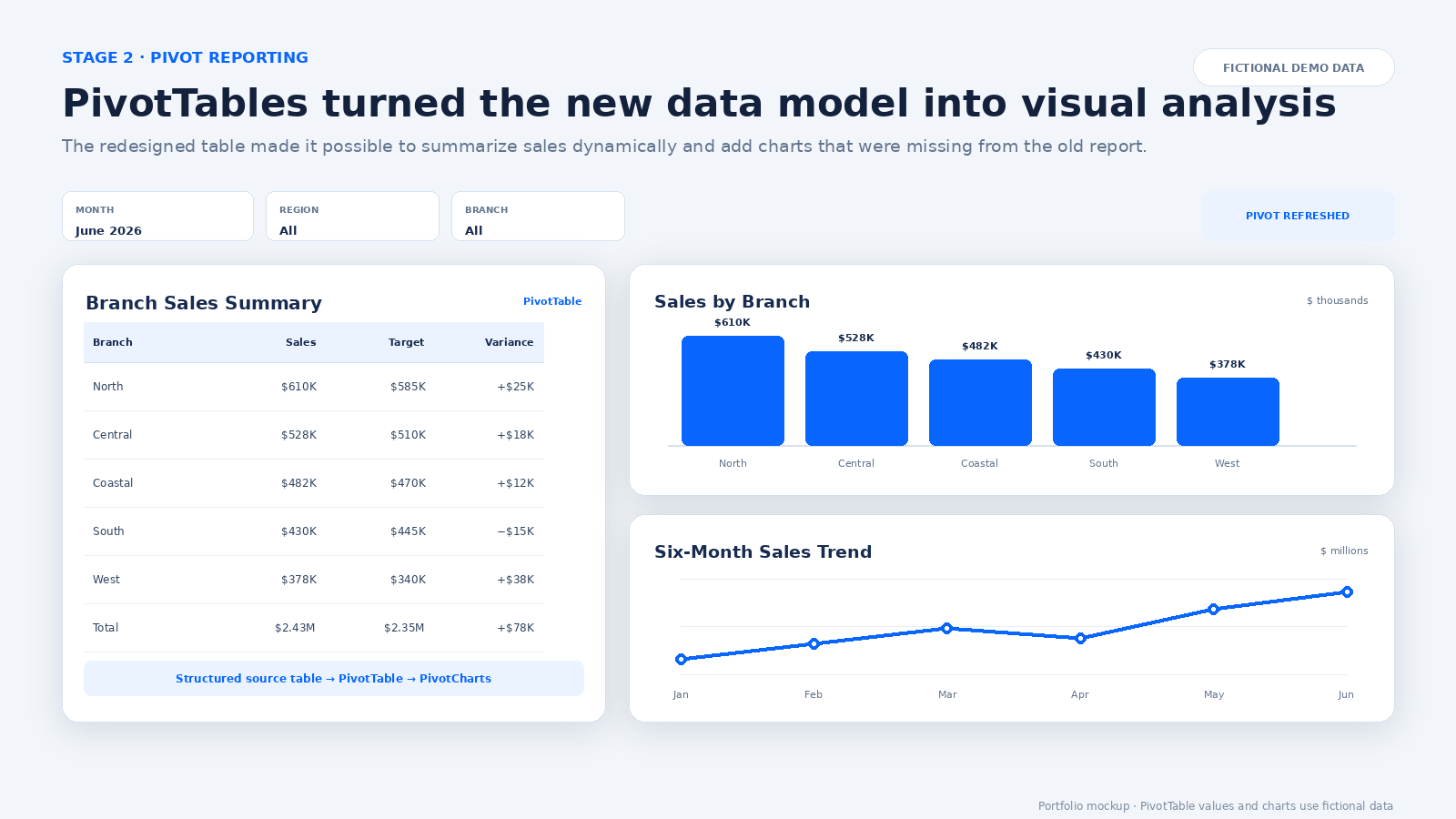
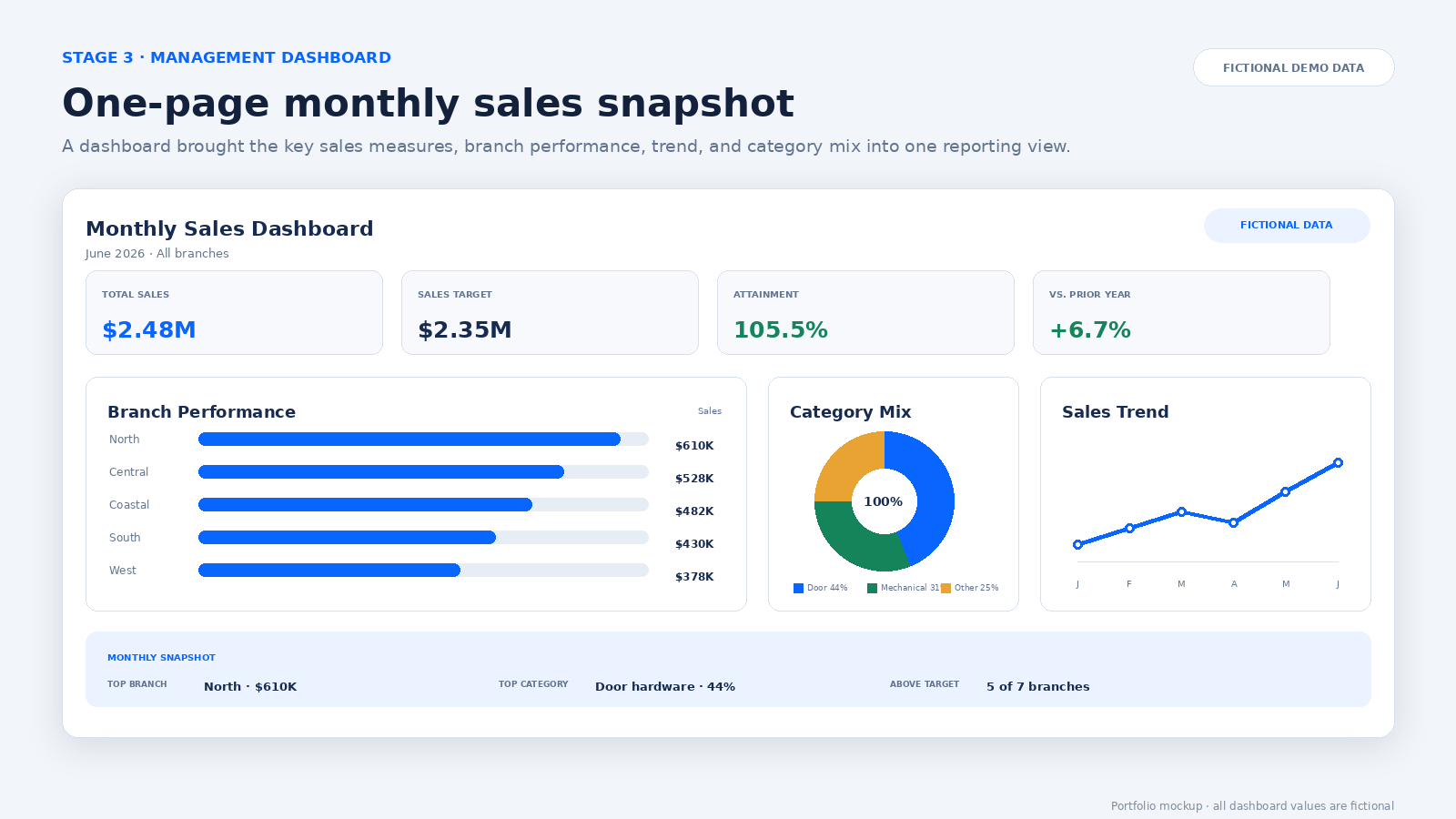
The row-based table created a reliable foundation for PivotTables, comparative charts, and a consolidated management view.
Technical workflow
One connected path from entry to insight.
My contribution
Redesigned the report from its foundation upward.
I led the workbook redesign from the underlying data structure through to the finished dashboard.
- Reviewed the limitations of the existing report layout and formulas.
- Restructured the source data into a row-based format.
- Converted the source range into an expandable Excel Table.
- Updated report logic with XLOOKUP and other modern formulas.
- Created PivotTables and PivotCharts for sales analysis.
- Designed a dashboard showing the complete monthly sales position.
- Organized the workbook to support easier updates and future branch additions.
Business impact
A report built to expand and communicate.
Key achievement
Connected structure, formulas, analysis, and presentation.
The most important achievement was not a single formula or chart. It was transforming a difficult-to-expand worksheet into a coherent reporting model: structured source data feeds maintainable formulas, the same data supports pivot analysis, and the results flow into a clear dashboard.
Potential future improvements
- Automated source-data validation and exception flags
- Power Query connections for recurring data imports
- Additional dashboard filters for region, product, and reporting period
- Automated distribution of monthly management reports
All sales figures, branch names, dashboard values, and workbook examples shown in this case study are fictional. They demonstrate the solution’s design without exposing confidential company information.
More work
Operational experience, strengthened by analytics.
Explore the rest of my portfolio or connect with me to discuss opportunities in procurement, supply chain, reporting, and business intelligence.